Python’s text editors and IDE 👨🏻💻
Loosely speaking, you have two possibilities. The first one is work with some text editors and join with some Python plugin like REPL (Read–eval–print loop) feature, this program can help you for writing scripts, edit the code or text. The second one is work with a Python’s IDE (Integrated development environment), which have an debugger, autocomplete, linting function, libraries, terminal incorporated, control version services, posibility to create a project (folder).
See also
Please check the full list for text editors.
In anywhere installation of Python, the program called IDLE is installed. For run this program in the background, please type the following instruction:
[user@hostname ~]$ idle &




[user@hostname ~]$ sudo dnf install vim     # Fedora, RHEL, Clear Linux.
[user@hostname ~]$ sudo apt install vim     # Debian, MX, deepin, elementary, Raspbian.
[user@hostname ~]$ sudo pacman -Sy vim      # Arch Linux, Manjaro.
[user@hostname ~]$ sudo zypper install vim  # OpenSUSE (Tumbleweed, Leap), SUSE.
After install, for example in OpenSUSE Tumbleweed:

Now, you already have installed vim in your system, type vim for execute.

[user@hostname ~]$ curl -sLf https://spacevim.org/install.sh | bash
[user@hostname ~]$ vim


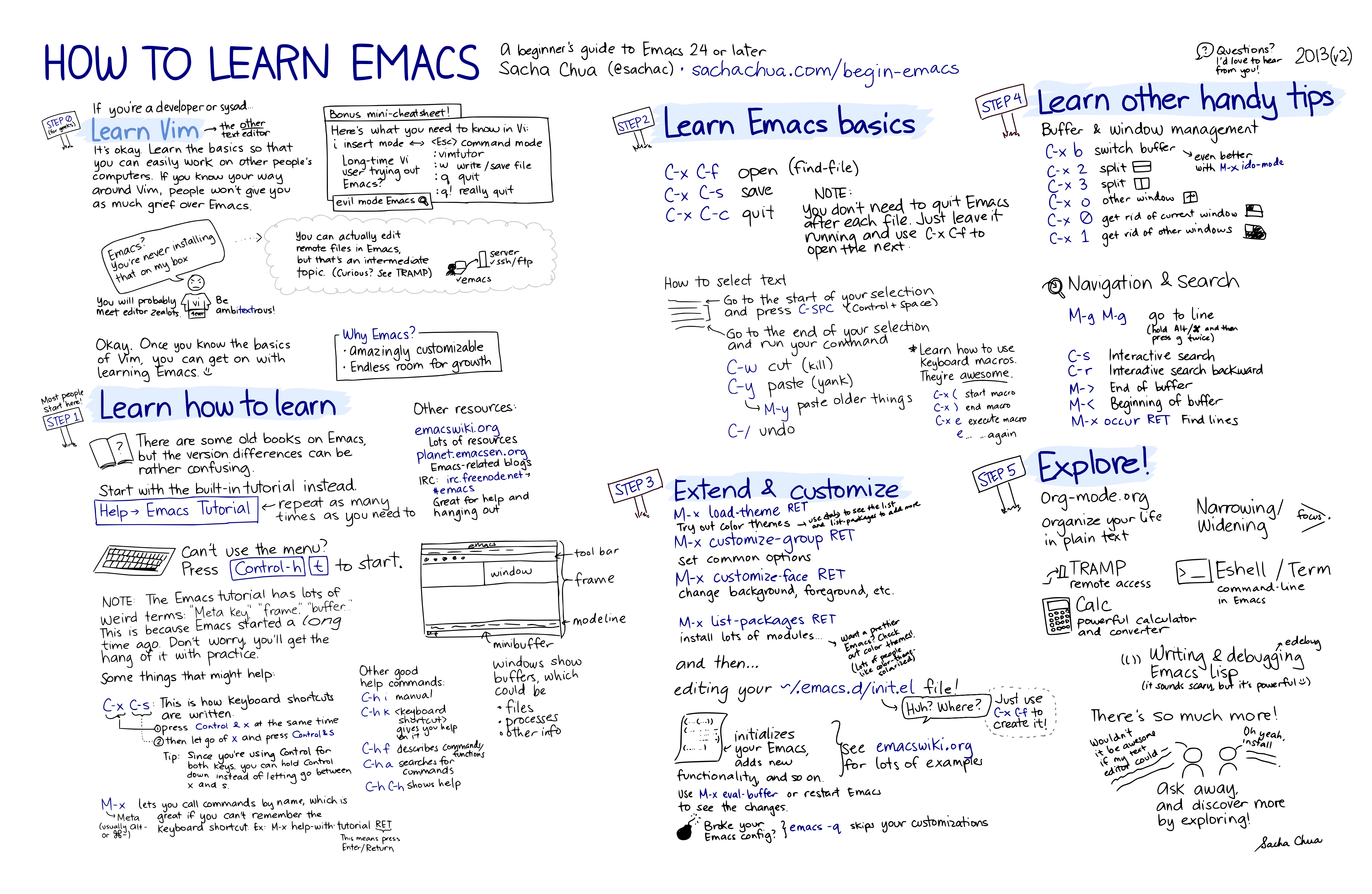
Some people think that the editor created by Richard Stallman in the 80’s uses cryptic keyboard shortcuts, in fact, this powerful Lisp machine allows you to read emails, surf the Internet, open images and videos.
Todo
Show this site in emacs.
You can use emacs-election \(\in\{\) emacs, emacs-nox, emacs-lucid \(\}\).
[user@hostname ~]$ sudo dnf install emacs-election     # Fedora, RHEL, Clear Linux.
[user@hostname ~]$ sudo apt install emacs-election     # Debian, MX, deepin, elementary, Raspbian.
[user@hostname ~]$ sudo pacman -Sy emacs-election      # Arch Linux, Manjaro.
[user@hostname ~]$ sudo zypper install emacs-election  # OpenSUSE (Tumbleweed, Leap), SUSE.
Note
If you are macOS user, could you opt for the program Aquamacs.
Users-name:~ User$ brew cask install aquamacs

Tip
Emacs have many options like --no-window-system, -nw.
[user@hostname ~]$ emacs -nw
The three core concepts for Emacs key bindings are modifiers, chords and sequences.
A modifier key is any one of the following. Anything else is a “non-modifer key”.
A chord is made up of zero or more modifier keys pressed at the same time as a single non-modifier key.
A sequence is a series of chords, pressed and released in a row. The most important command in Emacs, Ctrl-x + Ctrl-c, is a great example of a sequence.
M-x quickrun (show the output) The text you are editing in Emacs resides in an object called a buffer. SPC Tab: switch to previous buffer. SPC-x



[user@hostname ~]$ git clone --depth 1 https://github.com/hlissner/doom-emacs ~/.emacs.d
[user@hostname ~]$ export PATH=$HOME/.emacs.d/bin:$PATH >> ~/.zshrc
[user@hostname ~]$ source ~/.zshrc
[user@hostname ~]$ doom install


We prefer VSCodium over VS Code. The steps for the mainstreams linux distributions are in the website.
Users-name:~ User$ brew cask install vscodium
[user@hostname ~]$ yay -Sy vscodium

Please check out the tutorial.
First install PyCharm Community edition, open the terminal emulator and type
[user@hostname ~]$ sudo snap install pycharm-community --classic # Tested on lab with Ubuntu 18.04 LTS.
[user@hostname ~]$ sudo apt install python3-distutils # See https://askubuntu.com/q/1184913/791670
After the installation, please run the program PyCharm, this is found in the launcher application.

If you want to create a new project choose this and select Pure Python on the left.

Otherwise, if you want to open the folder where your Python files are, choose to open. Find the path of your working folder and click OK.

Now, wait a few seconds until you finish indexing the packages and see in the image below that you need to add the configuration.

Please go to File/Settings as seen in the image or press Ctrl + Alt + S.

Now, click on Project Interpreter and select the appropriate one, you will see the list of contained packages.

Finally, in each new file you want to run, you must perform the action Run or press Alt + Shift + F10.

Please check out this guide or other guide.
Atom. More interesting information in this survey.